
According to the release notes for Disk Station Manager (DSM) 7.2.2-72803. It would appear that Synology is removing DS Video from all its models of Network Attached Storage. For those not aware Video Station was a bundled package that provides video streaming. So after updating to 7.2.2, you will need to install and configure an alternative video streaming service.
Luckily there are a number of excellent streaming services you can use with your Synology NAS. So as an alternative you will find in Package Center, either Media Server Plex and Emby. However if your NAS is able, you might be better served installing Container Manager, and then using a Docker image of the media server you wish to run.
Unfortunately, with Synology removing DS Video, they also seemed to have removed support for the H.265 video codec. So reports from those that have updated would seem to indicate that File Station, Files, Photos and Surveillance Station have also been affected. This means that Surveillance Station cannot use motion detection unless it’s enabled on the camera, and your NAS will not be able to generate video thumbnails in any Synology application.
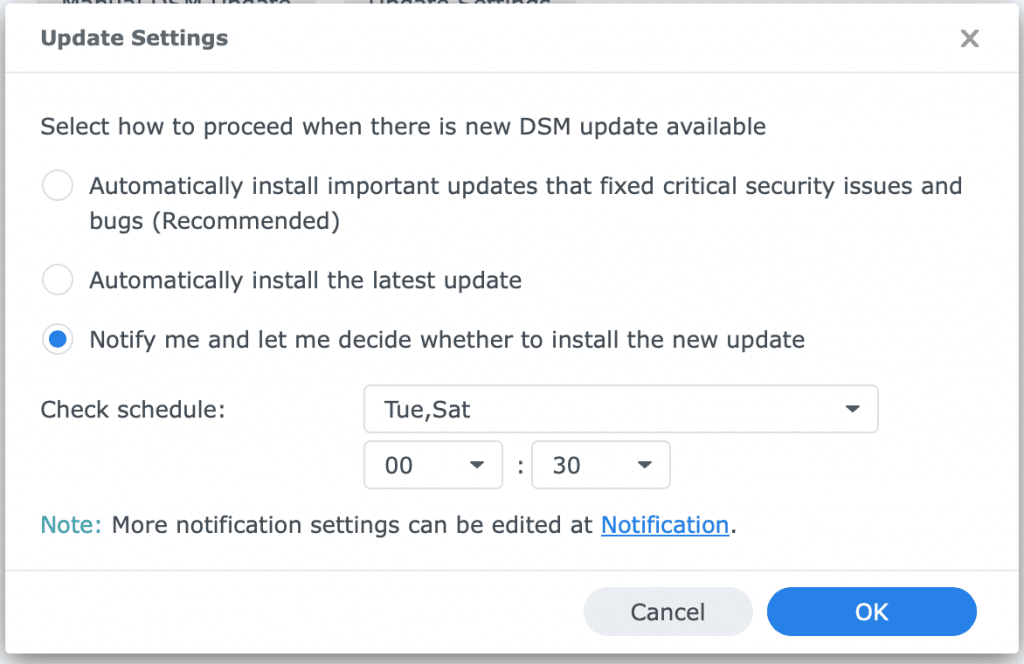
The only bit of good news is that currently DSM 7.2.2 is not mandatory, and DSM 7.2.1 will continue to be available and supported by Synology in the short term. So we recommend that you delay updating to 7.2.2, by turning off automatic updates.
If you have been following our Beginners Guide on setting a Synology NAS, you will already have done this. However you will find the settings for automatic updates in the DSM – Control Panel – Update & Restore – Update settings.
Why is Synology removing DS Video?
As far as we can tell, there may be two reasons why Synology has decided to remove DS Video. The first is that they cannot keep up with the development of the application. Which makes sense as we have not seen any major design changes or features added to Video Station in over 10 years.
The second reason Synology may have removed Video Station, is that it does not want to pay license fees for video codecs. In this instance video codec’s are pieces of software that compress or decompress media files. However in removing codec’s from Video Station, Synology has also removed codecs from Disk Station Manager. Which in turn would explain why other applications like Surveillance Station and File Station can no longer generate video thumbnails.
Website optimisation
As website optimisation seems to be as much an art as it is a science. It has taken most of the year for us to get to a place where we are happy with the performance of our website. So while there are still techniques that we can use to further optimise the site, for now we are going to re-focus on video projects.
However for anyone who might be looking to optimise their website, we thought it might be useful to reference what we used. While our website is hosted by IONOS, and they do offer a number of settings for performance optimisation. We could not get these settings to actually make any difference to the performance of our site.
Luckily as we built our website on WordPress, we were able to make some changes to the theme we use, in order to improve performance on mobile devices. However these speed improvements, were not big enough to give us a better score on PageSpeed Insights. So we decided to use a WordPress optimisation plugin.
We started with the most highly recommended optimisation plugin called WP Rocket. But for some reason we just could not seem to get it to work. So we jumped to W3 Total Cache which did work, but we found it overly complex to use.
On the verge of giving up, we finally jumped over to a plug-in called Hummingbird. While this was mostly because the settings used by the plugin were in a language we could actually understand. The plugin also has a setup wizard that was easy to use, and more importantly worked for us. So while we are currently using the free version of Hummingbird. When our subscription to W3 total Cache ends in the autumn, we will be subscribing to Hummingbird and its suite of Pro Plugins.
Current Project updates
Last month was another production disaster as I fell ill with FLiRT, a new strain of Covid. So not only did I have terrible fatigue and a pounding headache that lasted two weeks. I also lost my voice, and all sense of smell or taste. However while ill, I was able to work on some scripts so this month we will be focusing on voice work and trying to complete as many projects as we can.
Early Access content
This month we hope to be releasing an early access video, on how you Configure Notification on a Synology NAS. While this video will be included as part of our video on setting up basic security on a Synology NAS. We thought it was important enough to also make it a stand alone video.
We will also be releasing a video on checking the temperature on a Synology NAS, and a video on how to clear the search history data in Windows File Explorer. As to the video we promised last month. Our video on factory resetting the new Amazon Echo Dot, will now appear sometime later this month.
This months video release
This month we will be returning to a biweekly release schedule. So in September you can expect to see two videos being released on both the website, and our YouTube channel. For the first video, we will be looking at how you update a paid for SSL certificate on a Synology NAS. Then for the second video we will be turning our Synology router into an Apple Time Capsule.

Add comment