
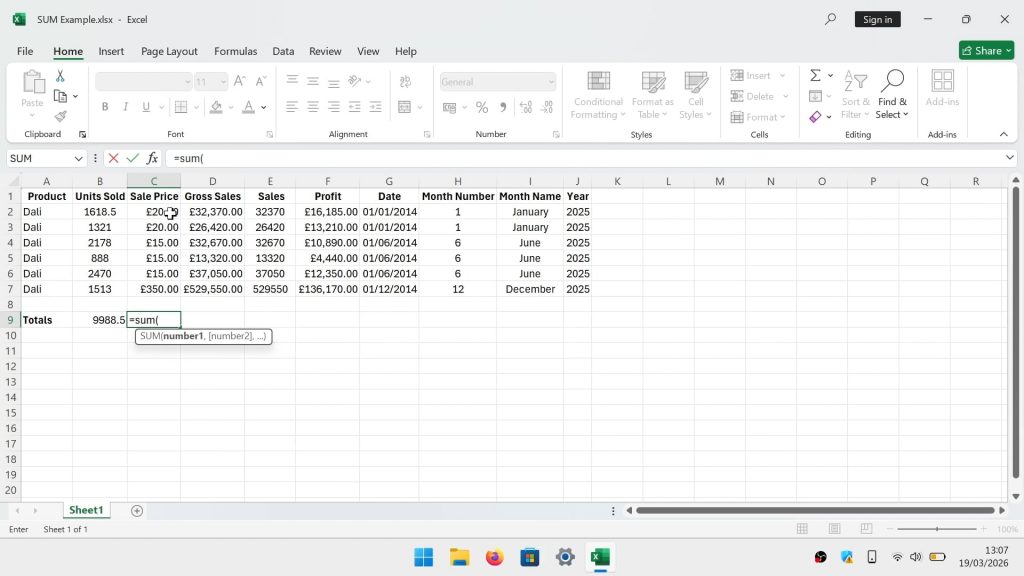
Microsoft Excel | the SUM function


The SUM function is probably one of the first functions you learn to use in Microsoft Excel. As it basically allows you to quickly add numbers together. So while you probably already know how to use the SUM function. For completeness let’s take a quick look at the SUM function, with a focus on using it in a RANGE.

Note: A Range is the selection of two or more cells in a Microsoft Excel spreadsheet. Something that is essential to know in order to construct formulas, add formatting or create charts. It’s worth noting that Ranges can be contiguous or non-adjacent. Which means a Range can be in sequence or made from multiple columns or rows.
The syntax for the SUM function is as follows:

=SUM(cell_ref_1,cell_ref_2)

With this being an example of an actual SUM formula:

=SUM(A1,A10)

Note: By using a comma between our two cell references. We are instructing Excel to add what’s in cell A1 to what’s in cell A10.

The syntax for the SUM function to add together a RANGE of cells is as follows:

=SUM(cell_ref_1:cell_ref_2)

Note: The SUM function is most commonly used in relation to a Range of cells. With a Range being the selection of two or more cells that are in sequence. However, in order to tell Excel you want to use a range, you need to replaced the comma with a colon.

This is an example of a range being used in a SUM formula:

=SUM(A1:A10)

Note: A range can either be Contiguous (together) or non-adjacent (selected individually). For example you might want to add two columns of numbers together. So that would be a non-adjacent Range. Something that you can do by highlighting cells in one column. Then holding down Ctrl, and selecting the range for a second column of cells.

The formula would look something like this:

=SUM(A1:A10,B1:B10)

Add comment

Your email address will not be published. Required fields are marked *

Support This Site

If you enjoy our content but don't want to be a site member. Please consider supporting us on Ko-fi to keep us ads free. Thanks for all your support

Our site members